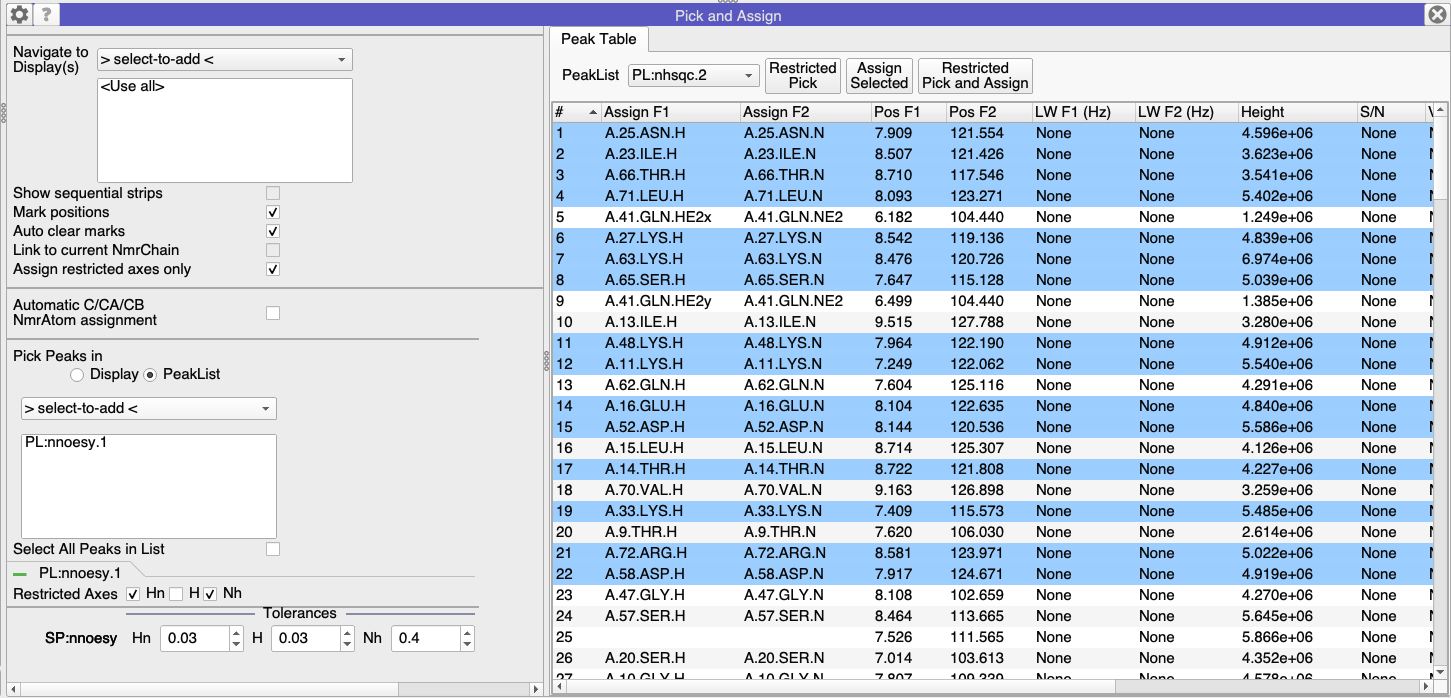
I am a first-time user of CCPNmr Analysis (v3) working on elucidating my protein’s structure using 3D NMR data. While following the tutorial “Solving Structures from NMR Data” (NOESY peak picking section), I encountered questions about Section 2C: Pick 3D Peaks from 2D Roots.
Issues Faced:
Step: “Select some or all peaks in your 2D HSQC.”
Does this mean simply clicking on peaks in the HSQC spectrum, or is there a specific selection tool?
Step: “Go to Main Menu > Structure > Restricted Peak Pick.”
I cannot find the “Structure” option in my CCPNmr main menu. Is this a version-specific feature, or am I missing a plugin?
To select peaks in your spectrum you can either click on peaks and hold down Ctrl (Cmd on a Mac) to select multiple ones, or you can drag the mouse over several peaks while holding down Ctrl/Cmd (you’ll get a pink selection box). You can also use Ctrl/Cmd+A to select all peaks in a spectrum. And finally, you can also do all of this in a peakTable rather than the spectrum if you prefer.
The Structure menu is only contained within AnalysisStructure. This means you need to start the program with analysisstructure rather than analysisassign.
However, it is worth pointing out that the latest version of the software (3.3.2) now also includes a different way to do all of this which doesn’t require Structure:
The Pick and Assign module (Main Menu → Assign → Pick and Assign, or shortcut PA) now includes a second tab call PeakList. Select peaks here (or in the spectrum - selection in one selects the other) and then in the Settings tab select a PeakList (in your case the 3D Noesy) into which you want to place the new peaks. And make sure that the H axis containing the NOEs is not selected as being a “Restricted Axis”:
Thank you very much, Vicky. That worked. I wonder whether C-NOE peak picking could be done based on an N-HSQC, as the C-HSQC is too crowded due to the large number of carbons.