hello,
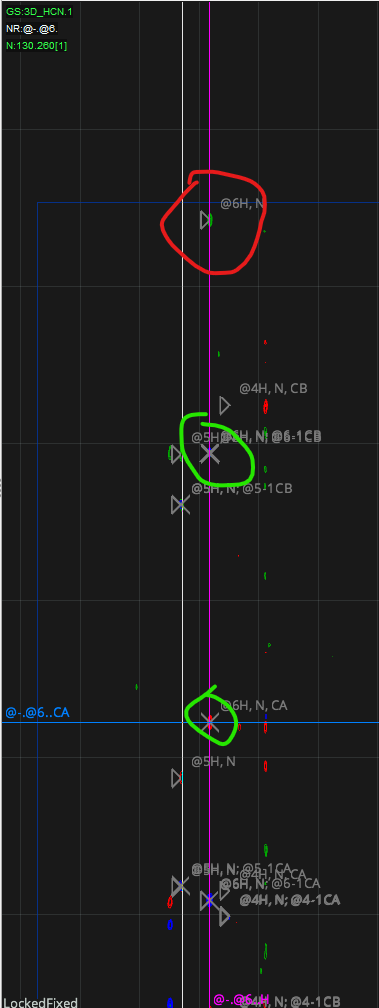
I am doing the backbone assignment now, when I did the “Restricted Pick and Assign” step , some detected peaks with editable “X” label , but some detected peaks with uneditable “▷” label and also can not be selected, please find the following figure
how we figure out this issue?
Hi
The peaks indicated with triangle symbols are out of the z region you’re looking at i.e. in front or behind the slice of the 3+D you have specified. You can see them and interact with them if you move your z position (use the control at the bottom of the window).
Most of the time these will be peaks from another residue/spin system that is almost overlapped with the one you are working on - you should be able to judge this from the 2D you are using to drive the restricted pick and assign.
If you have a lot of these cases and it is not due to almost overlapped signals, there are a few other things to check:
They may be processing artefacts e.g. from too fierce window functions around your peaks. In this case consider reprocessing the data and/or raise the contour level (and peak picking threshold).
It may be that you have higher than usual digital resolution in the z dimension so that the peaks from the same residue/spin system are distributed across several points. Try increasing the thickness of the z slice (controls at the bottom of the window) so it’s more than a single plane thick.
Best wishes
Brian
Just to add to what @bosmith has said: I’m surprised that you say the triangles cannot be selected. This was the case in earlier versions of the program, but we changed that some time ago. So if you are up-to-date with the latest version you should be able to click on a triangle to select that peak and edit it. But as Brian says, it is in fact in the plane above or below the one you are currently viewing.
Vicky
Another cause can be you have poor /isalignment of the n dimension flip axes on the right mouse click on the spectrum
The easiest cure for this is to
- open up an HNC window [use FA or
- Drag in an hsqc and each of you trip resonance spectra and make sure they are aligned
- I they aren’t re reference the spectra… [righ click on the spectrum ’tablet’ on the top bar select properties, select dimensions
- Fiddle with referencing (ppm) by small amounts and apply till well aligned
regards
Gary
Dr Gary S Thompson NMR Facility Manager
CCPN CoI & Working Group Member
Wellcome Trust Biomolecular NMR Facility
School of Natural Sciences
University of Kent, Canterbury, Kent, England, CT2 7NZ
 :01227 82 7117
 : g.s.thompson@kent.ac.uk
orchid: ORCID
If re-referencing is the issue, then you can also take a look at the information on re-referencing/calibrating spectra here:
Vicky
Hello all,
Thank you so much for these solutions. we have fixed it. we really appreciate your help.
Thanks,
Ning