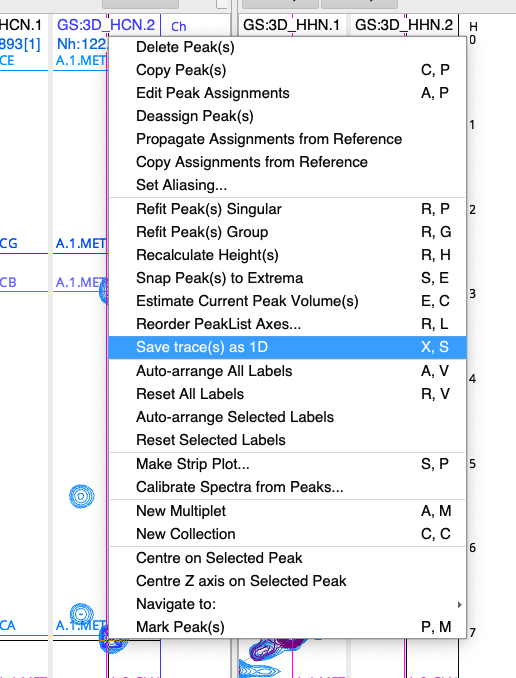
Is there any way to save the slices extracted from 2D to be saved with the project? Every time I extract some slices, save the project and reopen it later the actual traces are gone.
I am using v 3.3.2.3 on Mac but this seemed to be always a “feature” in previous versions of v. 3 both on Mac and windows.
yes, I think @LucaM had originally only intended the macro as an on-the-fly thing to check your data. But it certainly makes sense to me to save the data. The question is where. In the same place where the 2D data is stored or inside the project (in the spectra subfolder)?? Of course every user will want something different and if we start asking some will get annoyed with the pop-up!
I would be minded to save these to the project, given that 1Ds are not so large. But happy go for something different if others think that is a bad idea.
The other question is the name - would it be helpful to have something other than
spectrumName-slice-numberOfDimension? We could include the ppmPosition, for example?
Happy with saving in the project. Happy with saving in the spectra subfolder.
Adding ppmPosition to the name would be fantastic - this is what I am doing currently manually.
Is there a command I can use from the console to save it somewhere (before it becomes a feature)? I have a project where I have extracted quite a few slices and would hate to have to redo this from scratch.
Thanks!
hi. If you run the updates the same macro will now save the spectra to your project data folder.
For saving existing spectra, you can use the command:
spectrum.toHdf5('yourpath/fileName')
you could add all your traces to a spectrum group from the sidebar.
Right click to the SpectrumGroum and click ‘copy Pid to Clipboard’.
Open the iPythonConsole
run a macro like:
sg = get('SG:mySpectrumGroup')
for sp in sg.spectra:
 sp.toHdf5(project.spectraPath/sp.name) #do your path as required
There are two considerations: this command unfortunately will duplicate your spectra in the project. Not sure why this feature was put in; A bug was reported a week ago or so (Sept/'25), [fixed only a couple of day ago] that will affect this functionlity, in other words ‘toHdf5’ maybe won’t work in your current version.
If you need to redo the traces, could be automated from existing peaks?
Just a quick note to say that from version 3.3.3 onwards (released on 22 October 2025), when you right-click on a selected peak you can choose Save trace(s) as 1D, or you can use the shortcut XS (for eXtract Slice).