Hello,
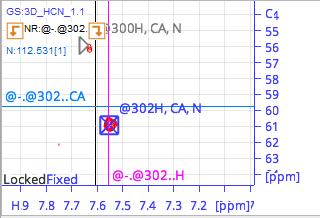
I have been trying to assign a protein, but in some residues when i try to find the previous or next residue, the prediction uses the wrong frequency.
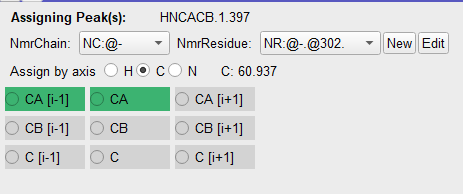
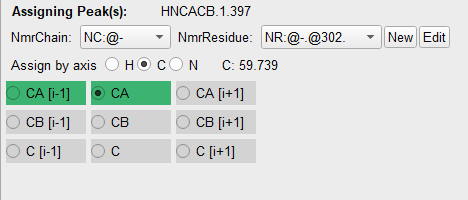
When I try to redo the peak assignment to CA it returns to the wrong value.
Notice that the frequency of the carbon changes after assigning the peak as CA.
Is there something that I’m doing wrong? It’s my first time assigning a protein.
Thank you very much,
Alejandra
Hi & welcome to the joys of protein assignment.
I suspect that we may need to see your project (archive without the raw data and then send the archive to support@ccpn.ac.uk) but in the meantime…
The software looks for the shift of the NmrAtom(s) that you have asked it to when you click on a residue or “-1” placeholder residue in the backbone assigner. The shift it uses is the one from the relevant chemical shift list - which is an average of all the peak positions where that assignment has been made.
So likely you have the troublesome CAs assigned to other peak(s) already somewhere in your project. If you open up the chemical shift list as a module from the sidebar you can see how many peaks are contributing to each assignment as well as some stats about how similar their shifts are. Currently we don’t have a GUI route straight from that table to the individual peaks, but it’s not too hard to find them in your peak lists.
Typical situations include:
-
An incorrectly assigned peak such as a noise/artefact peak that’s at a different shift
-
Already assigned spectra from different conditions in the same project - these should be grouped into separate chemical shift lists
The shift changing when you make the assignment in the assignment panel is (I suspect) it switching from displaying the peak’s shift when it’s not assigned, to the NmrAtom’s average shift when it is assigned.
I agree with Brian’s assessment of what is likely going on here.
But when he says
Currently we don’t have a GUI route straight from [the Chemical Shift List] table to the individual peaks
he isn’t quite right.
Rather than opening a Chemical Shift List, open the Assignment Inspector (Main Menu / Assign / Assignment Inspector or shortcut AI). This will give you a Chemical Shift List table at the top and then the individual peaks below. And you can use the little Atom selection list on the left hand side the filter the peaks by atom name (e.g. CA).
To navigate from the peaks to the spectra, open the AI settings and select the NH spectrumDisplays you want to navigate in. Then double-click on the peaks. (Double-clicking on the NmrAtoms in the ChemicalShift table will do slightly more complicated navigating!)
That should help you find the peaks contributing to your average Chemical Shift fairly easily.
Vicky
Hello,
Now it makes sense! It was exactly that. I switched the CA and CA-1 in the NHCA but was only looking at the HNCACB… And thank you for recomending the Assingment Inspector, it was much easier to check.
Thank you very much,
Alejandra
1 Like
What you recomended before helped me with many peaks that i had problems with, but now I encountered one that cant be resolved using the Assignment Inspector.
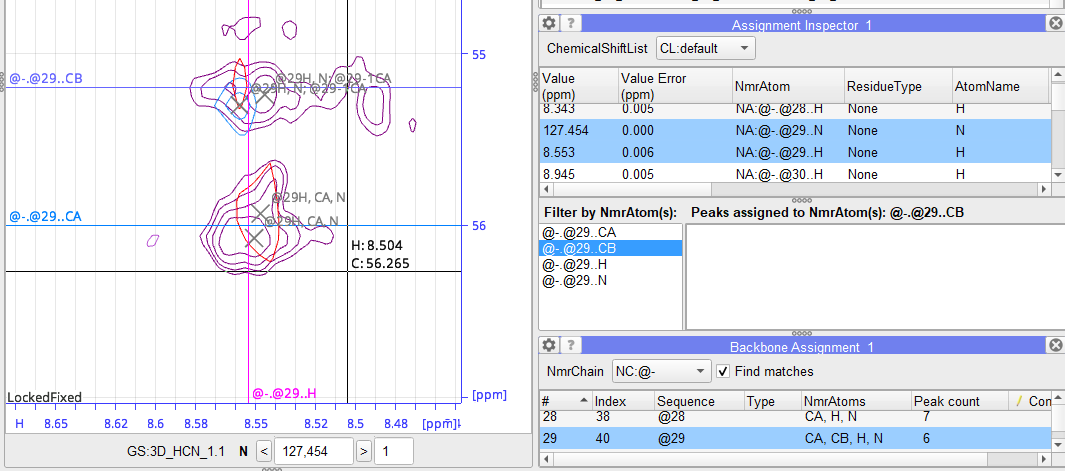
In this case, although I only have CAs (verified by counting the peaks, checking the labels and also checking in the assignement inspector that shows zero CB peaks), both in the backbone assignment and in the spectra it shows a CB frequency. Is there any other place where I can check?
Sorry for the insisting, these ghost peaks are giving so many problems…
Thank you very much,
Alejandra
You have probably encountered the “orphaned shift” feature.
When you have assigned an NmrAtom to a peak, the appropriate shift from the peak contributes to the calculation of the NmrAtom’s shift as we discussed before.
When you remove an NmrAtom from all the peaks that it’s been assigned to, it doesn’t get destroyed, but lives on in the ShiftList with its last known shift. (this is a feature not a bug, see the other recent thread about transfering assignments).
So if you want an NmrAtom to be “garbage collected” after it’s been disconnected from all the peaks it was assigned to (maybe just for spectra within a ShiftList), you need to do this explicitly. We call this “deleting orphaned shifts” and the functionality is available as a right mouse click menu item when you click on a ShiftList in the sidebar.
That’s quite an interesting name. It solved my problem!
Thank you very much for the help!!!
We have some background information on Chemical Shifts and the way they are used in the program which you may find helpful:
Vicky
Thank you very much!! You have been a great help!!
1 Like